
NanoClip , also on the App Store
Mac Clipboard Manager with AI Flows
At a glance
- Productivity
- Free · $9.99 Pro
- iCloud sync
About NanoClip
A native Mac clipboard manager, snippet library, and automation tool built around Flows. Save everything you copy, organize reusable snippets, and instantly transform text, images, files, and clipboard content from your menu bar.
Screenshots

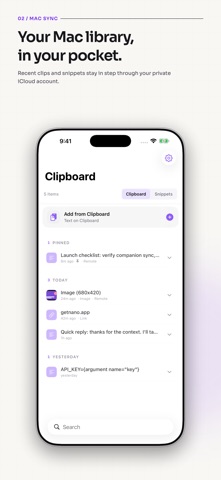

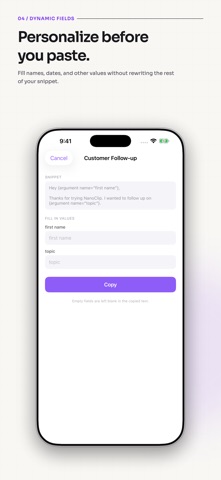
From the developer's own App Store listing.
Features
- 📋 Clipboard history: Every copy saved automatically. Search instantly, paste with a keystroke, pin favorites.
- ✂️ Smart snippets: Reusable text templates with dynamic placeholders for signatures, replies, and code.
- ⚡ Flows: Clean text, format JSON, transform URLs, OCR images, summarize, rewrite, translate, and chain steps.
- 🤖 AI-powered actions: Run AI Flows to summarize, rewrite, extract info, generate structured output, and process images.
- 📝 Edit in place: Press Cmd+E to tweak any clipboard item inline before pasting.
- 🔁 Sequential paste: Queue multiple items and paste them one by one in order.
- 🔗 Rich link previews: Copied URLs show titles, favicons, and preview images.
- 📊 Personal stats: Track streaks, busiest hours, top apps, content types, and flow usage.
- 🎨 20 themes & 14 fonts: Catppuccin, Nord, Dracula, Tokyo Night, Liquid Glass, JetBrains Mono, and more.
- ☁️ iCloud sync: Clipboard history and snippets sync across all your Macs. No accounts, no servers.
- 🔒 Privacy first: Content obfuscation hides passwords and API keys. Data stays on-device or in your private iCloud.
- ⌨️ Keyboard-first design: Navigate, search, edit, pin, queue, run flows, and paste without touching the mouse.
How NanoClip works
Copy anything
Text, images, links, files, code, or colors: NanoClip captures it all automatically.
Hit your hotkey
Bring up the picker, type to search, scroll back through time-grouped entries.
Paste or run a Flow
Press Return to paste, or trigger a Flow to transform, summarize, OCR, or rewrite first.
More productivity apps
See the category-
 MightyMouse Your phone turns into your computer. See your screen, move the cursor, talk to it from anywhere. Transcription is free and stays on your Mac. At your desk, hold one key and speak. The words land in whatever app you are in. Use the AI you already pay for, or a local model. Runs from the macOS menu bar and a hold-to-talk hotkey.
 -
 Murmure Murmure — voice dictation for macOS that never leaves your Mac. Hold a shortcut, talk, text lands in the active app. whisper.cpp, free, MIT.
 -
 Shoji Shoji splits each monitor into zones you draw. Drag a window over one and it snaps into place. A native Mac app, $4.99 once.
 -
 ClapSnap A macOS menu bar app that opens your whole workspace on a double clap or snap — and moves, clicks, and scrolls your cursor from hand gestures. One-time purchase.
 -
 Offset Offset automatically arranges your Mac windows, so your workspace stays organized while you stay focused.
 -
 Sayburst Sayburst is a native Mac menu bar dictation app for Apple silicon. Hold fn to speak into the app you use. Speech recognition runs locally with Whisper or Parakeet; custom vocabulary, per-app writing modes and local history/recovery help keep your words usable. Optional cloud writing sends text and enabled context to your selected provider. macOS 14+. Seven-day free trial; $29 once for one Mac or $49 for three, including 1.x updates.