
NanoClip , also on the App Store
Mac Clipboard Manager with AI Flows
Freemium
MaciPhoneiPad
At a glance
- Productivity
- Free · $9.99 Pro
- iCloud sync
Screenshots

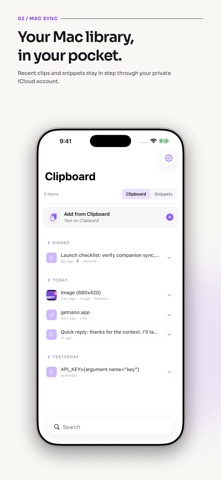

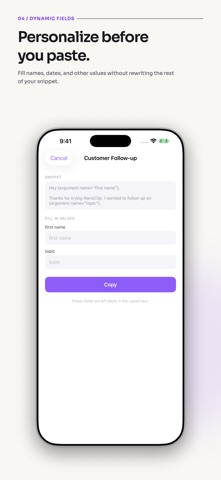
From the developer's own App Store listing.
About NanoClip
A native Mac clipboard manager, snippet library, and automation tool built around Flows. Save everything you copy, organize reusable snippets, and instantly transform text, images, files, and clipboard content from your menu bar.
Features
- 📋 Clipboard history: Every copy saved automatically. Search instantly, paste with a keystroke, pin favorites.
- ✂️ Smart snippets: Reusable text templates with dynamic placeholders for signatures, replies, and code.
- ⚡ Flows: Clean text, format JSON, transform URLs, OCR images, summarize, rewrite, translate, and chain steps.
- 🤖 AI-powered actions: Run AI Flows to summarize, rewrite, extract info, generate structured output, and process images.
- 📝 Edit in place: Press Cmd+E to tweak any clipboard item inline before pasting.
- 🔁 Sequential paste: Queue multiple items and paste them one by one in order.
- 🔗 Rich link previews: Copied URLs show titles, favicons, and preview images.
- 📊 Personal stats: Track streaks, busiest hours, top apps, content types, and flow usage.
- 🎨 20 themes & 14 fonts: Catppuccin, Nord, Dracula, Tokyo Night, Liquid Glass, JetBrains Mono, and more.
- ☁️ iCloud sync: Clipboard history and snippets sync across all your Macs. No accounts, no servers.
- 🔒 Privacy first: Content obfuscation hides passwords and API keys. Data stays on-device or in your private iCloud.
- ⌨️ Keyboard-first design: Navigate, search, edit, pin, queue, run flows, and paste without touching the mouse.
How NanoClip works
-
Copy anything
Text, images, links, files, code, or colors: NanoClip captures it all automatically.
-
Hit your hotkey
Bring up the picker, type to search, scroll back through time-grouped entries.
-
Paste or run a Flow
Press Return to paste, or trigger a Flow to transform, summarize, OCR, or rewrite first.
Questions
Is NanoClip free?
NanoClip is free to download, with a paid upgrade for more.
Is NanoClip on the Mac App Store?
Yes, NanoClip is on the Mac App Store, so it is reviewed and signed by Apple and installs and updates through the App Store.
What does NanoClip run on?
NanoClip runs on the Mac. It is also available for iPhone and iPad.
Who makes NanoClip?
NanoClip is made by Victor Baro.
Are there alternatives to NanoClip?
Yes. This directory lists 80 other productivity apps for the Mac menu bar, and its alternatives page compares them with NanoClip.
Views, day by day
Busiest day: Tue 17 Nov, 26 views.
Counted here, on this site: people who opened this page, and how many of them went on to the developer.
More productivity apps
-
 Tomette Tomette puts a focus timer in your Mac's menu bar, right beside the clock. When a focus ends, the break starts by itself and suggests something to do away from the screen. In the middle of something? +5m keeps you going and makes the next break longer to match. Pin the one task you're on, with up to five steps. Pay €7 once. No account, no tracking.
-
 paisty paisty is a menu-bar app for Apple Silicon Macs. Click the paisty mark in Mail, Gmail, Outlook, Slack, Messages, a form or a doc, and a draft lands in the box you were typing in. You edit and send; it never sends on its own. Bring your own AI (Claude, ChatGPT or a local model), and your key stays on your Mac.
-
 KeyAct Translator & Dictionary Copy a sentence and press Command-G to translate it from the Mac menu bar. Translation, synonyms and dictionary lookup are free. A one-time Full Access purchase adds verb conjugation, spell checking, voice notes and other tools. Requires macOS 15 or later.
-
 Exhibit Exhibit exports iMessage, SMS, WhatsApp, Signal, Telegram and more on your Mac into one PDF, with the exact date and time on every message, photos where they were sent, and read receipts. The menu bar icon lists your recent conversations, with search and one-click Create Exhibit. Need it for court? It adds Bates numbers, redaction and a SHA-256 verification page. Everything stays on your Mac: no account, nothing uploaded. $19.99 once, no subscription, 7-day refund. Requires macOS 14 or later.
-
 TOM Native macOS app that records meetings, voice notes, and screen feedback, transcribes them live, and makes them searchable. Recordings, transcripts, and AI all run on your Mac. Free and open source.
-
 VoiceInk The best open-source alternative to Superwhisper & Wispr Flow. Voice-to-text app for macOS with no subscription