

Perch , also on the App Store
Apple Reminders, One Hotkey Away
At a glance
- Productivity
- €2.99
- No network access
About Perch
Perch keeps Apple Reminders a hotkey away. The panel drops over whatever you're working on, and Esc puts it back with your work exactly where you left it. Type a sentence like “Email Sam this evening !! /Work” and Perch reads the date, time, priority and list straight out of it. It isn't a second list: it reads and writes the reminders you already keep, so anything you add turns up in Reminders on your iPhone and iPad through iCloud.
Screenshots

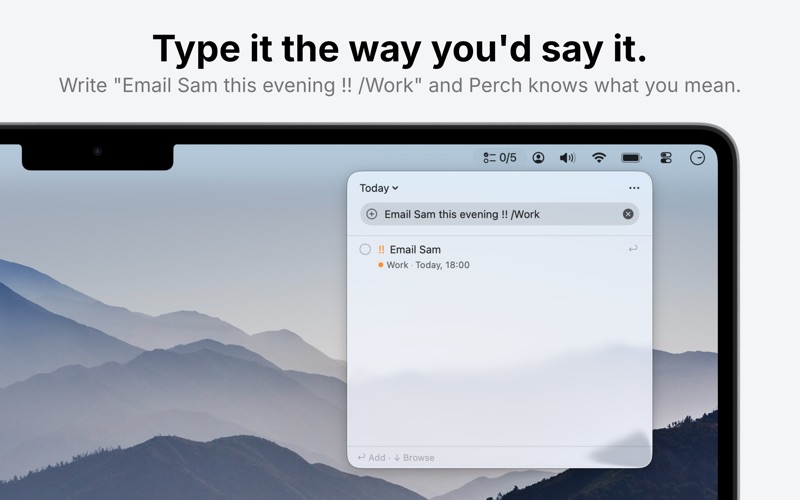


From the developer's own App Store listing.
Features
- Hotkey Panel: Press the shortcut and the panel drops over whatever you're doing; press Esc and it's gone, with your work exactly where you left it.
- Plain-Sentence Capture: “Email Sam this evening !! /Work” becomes a reminder for this evening, high priority, in the Work list, no fields to tab through.
- Not a Second List: Perch reads and writes Apple Reminders itself, so there is nothing to migrate and nothing to keep in sync by hand.
- Everywhere You Already Have Reminders: Because they are the same reminders, what you add appears on your Mac, iPhone and iPad through iCloud.
- No Network Connections: No account, no analytics, and no network connections of any kind.
- €2.99 Once: A single payment, not a subscription.
Why Perch?
Apple Reminders is a perfectly good place to keep things, it syncs, it's already on every device you own, and it costs nothing. What it isn't is fast to reach. Opening the app, finding the right list and filling in the date fields is enough friction that the thought you wanted to capture gets dropped instead. Perch shortens that to a keystroke and a sentence.
Press the Hotkey
The panel drops over whatever you're doing, no window to find, no app to switch into.
Type It as a Sentence
Say when, how urgent, and which list in plain language; Perch pulls the date, time, priority and list out of the line.
Press Esc
The panel goes away and your work is exactly where you left it. The reminder is already in Apple Reminders.
Questions
What is Perch?
A macOS menu bar app for Apple Reminders. A hotkey drops a panel over your work so you can add or check a reminder without leaving what you're doing.
Does it replace Apple Reminders?
No. Perch reads and writes the reminders you already keep, so it isn't a second list to maintain and there is nothing to migrate.
What can it read from a sentence?
The date, the time, the priority and the list. “Email Sam this evening !! /Work” sets all four in one line.
Will reminders I add show up on my iPhone?
Yes, they are the same reminders, so they sync through iCloud to your Mac, iPhone and iPad the way Reminders always has.
Does it connect to the internet?
No. The developer states there is no account, no analytics, and no network connections of any kind.
How much does it cost?
€2.99 as a one-time purchase. There is no subscription.
More productivity apps
See the category-
 MightyMouse Your phone turns into your computer. See your screen, move the cursor, talk to it from anywhere. Transcription is free and stays on your Mac. At your desk, hold one key and speak. The words land in whatever app you are in. Use the AI you already pay for, or a local model. Runs from the macOS menu bar and a hold-to-talk hotkey.
 -
 Murmure Murmure — voice dictation for macOS that never leaves your Mac. Hold a shortcut, talk, text lands in the active app. whisper.cpp, free, MIT.
 -
 Shoji Shoji splits each monitor into zones you draw. Drag a window over one and it snaps into place. A native Mac app, $4.99 once.
 -
 ClapSnap A macOS menu bar app that opens your whole workspace on a double clap or snap — and moves, clicks, and scrolls your cursor from hand gestures. One-time purchase.
 -
 Offset Offset automatically arranges your Mac windows, so your workspace stays organized while you stay focused.
 -
 Sayburst Sayburst is a native Mac menu bar dictation app for Apple silicon. Hold fn to speak into the app you use. Speech recognition runs locally with Whisper or Parakeet; custom vocabulary, per-app writing modes and local history/recovery help keep your words usable. Optional cloud writing sends text and enabled context to your selected provider. macOS 14+. Seven-day free trial; $29 once for one Mac or $49 for three, including 1.x updates.