

WhatCable
Know What Your USB-C Cable Can Really Do
At a glance
- macOS 14+
- Utilities
- Free & Open Source
Screenshots
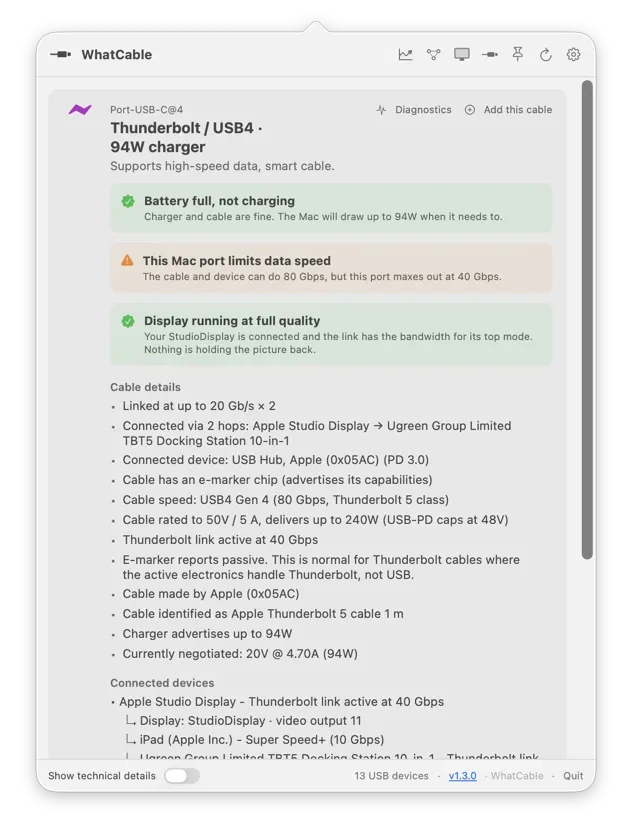
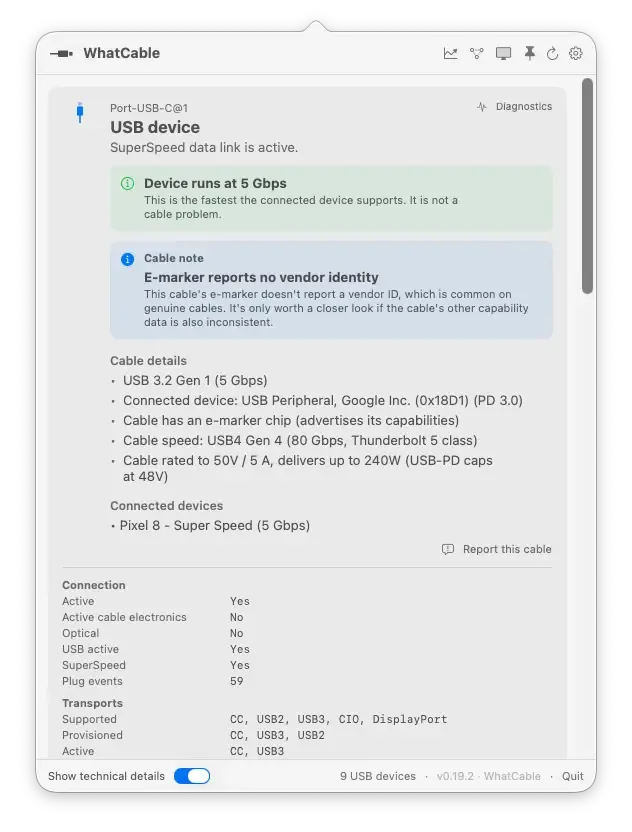
From the developer's own website.
About WhatCable
WhatCable is a macOS menu bar app that reads the e-marker chip inside your USB-C cables and tells you in plain English what each one can actually do. When something is charging slowly or running at reduced speed, it names the weak link, the Mac port, the cable, or the device. It reads what macOS already exposes through IOKit, with no helper daemon and no network lookups.
A cable never works alone. WhatCable reads the port, cable, charger, adapter and connected device together, then explains the result in plain English.
See what the charger offers, what the cable supports, and whether the Mac is drawing all the power it needs. WhatCable explains the result instead of leaving you to swap components at random.
Features
- Plain-English Cable Specs: The cable's real speed (USB 2.0, 5 / 10 / 20 / 40 / 80 Gbps), current rating up to 240W, and the e-marker chip's vendor.
- Charging Diagnostic: A banner tells you whether the cable is the limit, the Mac is asking for less, or everything is matched, like "Charging at 30W (charger can do up to 96W)".
- Data-Speed Diagnostic: A verdict on what's capping the link, port, cable, or device, shown in the popover, the CLI, and JSON output.
- USB-IF Certification Check: Cables carrying a certificate ID are matched against a bundled USB-IF list, entirely offline, and reported as a fact about the ID rather than a verdict on the cable.
- Cable Trust Signals: Flags e-marker values that look unusual against the USB-PD spec, with deliberately hedged wording, "this looks unusual", not "this is fake".
- Charger PDO List: Every voltage profile the charger advertises, with the currently negotiated one highlighted live.
- Thunderbolt Fabric View: Per-lane speed, generation (TB3/TB4/TB5), the switch topology through docks, and which tunnels ride that link.
- Desktop Widgets & CLI: WidgetKit widgets in three sizes, plus a bundled CLI with JSON output and a watch mode for cable swapping.
- 19 Languages: The interface follows your system language or one you pick, across nineteen translations.
- Free & Open Source: The core app is MIT licensed with source on GitHub.
- WhatCable Pro (£9.99 One-Time): Adds cable history, live power metering, Negotiation and Display Diagnostics, port health counters, and a terminal dashboard, on up to 2 Macs.
Why WhatCable?
USB-C hides everything behind one connector, a charge-only USB 2.0 cable and a 240W, 40 Gbps Thunderbolt 4 cable look identical in the drawer. macOS already knows the difference; WhatCable just shows you, and explains which link in the chain is holding things back.
-
Plug In
Connect any USB-C cable, charger, dock, or display to your Mac.
-
Open the Popover
Each port gets a headline, the cable's real specs, and a diagnostic banner if something is limited.
-
Find the Weak Link
See whether the port, the cable, or the device is capping speed or charging, then swap the right one.
Questions
What is WhatCable?
A macOS menu bar app that reads the e-marker chip in your USB-C cables and reports, in plain English, what each cable and port can actually do.
Do I need extra hardware?
No. macOS already exposes this information through IOKit: WhatCable surfaces it as a menu bar popover.
Why is my Mac charging slowly?
That's the question it's built for. A banner names the bottleneck: a cable rated below the charger, a Mac asking for less power, or a battery that's simply full.
Does it send anything over the network?
No. The USB-IF certification list is bundled with the app, so certificate IDs are matched offline. There's no helper daemon and no background uploads.
Is it on the Mac App Store?
No, deliberately. The sandbox blocks the SMC access behind Pro's live power metering, and the bundled CLI doesn't fit the store's install model, so it ships signed and notarised outside the store.
What does Pro add?
Cable history with per-cable timelines, live power metering, Negotiation and Display Diagnostics, port health counters, pin diagrams, and a full-screen terminal dashboard. It's a £9.99 one-time purchase for up to two Macs.
What are the requirements?
macOS 14 or later.
Is it open source?
The core app is MIT licensed on GitHub. The Pro plugins are proprietary and live in the same repository under a separate licence.
Views, day by day
Busiest day: Sat 21 Nov, 60 views.
Counted here, on this site: people who opened this page, and how many of them went on to the developer.
More utilities apps
-
 Mouse Jiggler Keep your Mac awake while you read, watch a dashboard, or wait for a long task. Mouse Jiggler lives in the menu bar and offers automatic cursor movement, an idle delay, weekday schedules, and stop controls. Free to download, with optional PRO features.
-
 Disk Housekeeper Disk Housekeeper is a native macOS 26 disk cleaner: menu bar free space, Smart Clean for developer caches, Auto-Sort, Autopilot, and a preview before removal.
-
 Mac Window Manager for Tiling & Snapping Tangrid is a native Mac window manager with automatic tiling, snapping, window tabs, search and Dock previews. Try it free for 7 days on macOS 14 or later.
- Sentinely Sentinely warns you minutes before your Mac runs out of memory, frees what idle AI sessions and stuck editors hold in one click, and measures it.
-
 SmoothWheel SmoothWheel is a free, MIT-licensed macOS menu-bar utility that smooths standard mouse-wheel scrolling. Tune speed and smoothing, choose three presets, and exclude individual apps. Continuous trackpad input passes through unchanged. Apple Silicon; requires Accessibility permission.
-
 EchoKeys EchoKeys is a macOS utility designed for screen recording, livestreaming, tutorials, game capture, and product demos.