
VibeMenu
Keep Your Mac Awake While Coding Agents Work
At a glance
- macOS 15+
- Development
- Free & Open Source
Screenshots
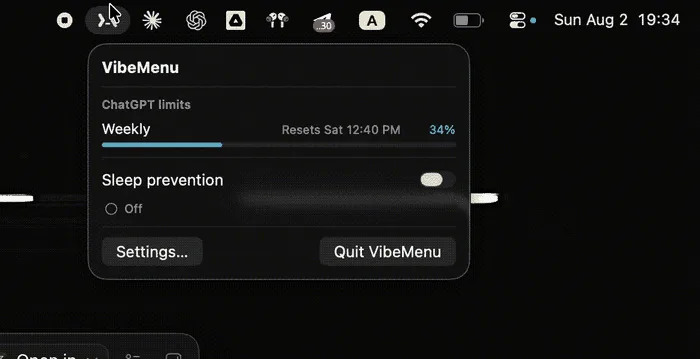
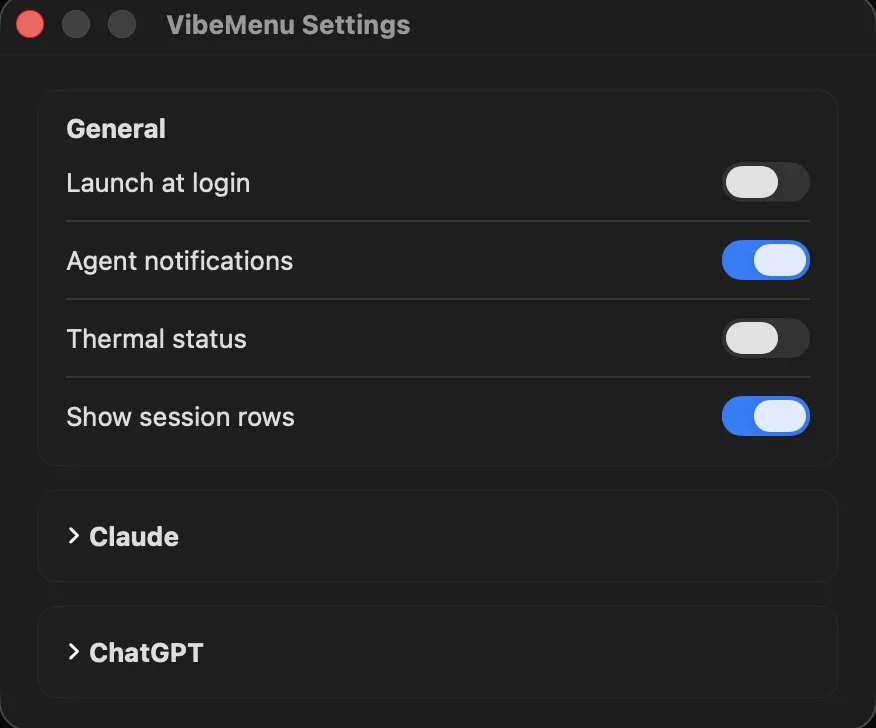
From the project's README on GitHub.
About VibeMenu
VibeMenu is a local-only macOS menu bar app that keeps your Mac awake while Claude Code, Codex, or ChatGPT Work is actually working, then releases the hold when the run finishes. It shows which sessions are running, which are done, and which are blocked waiting on your approval, alongside usage limits and macOS thermal pressure. Free and open source, with no telemetry and no account.
VibeMenu is a free, open-source macOS menu-bar app for Claude Code and the ChatGPT desktop app. It gives you one place to see supported agent sessions, sleep-prevention ownership, locally available Claude and ChatGPT usage limits, Claude attention notifications, and macOS thermal state.
Features
- Automatic Keep-Awake: Holds a macOS power assertion while an agent is working and releases it when the work finishes, no more sleeping mid-run.
- Truthful Status: The menu shows whether the assertion is genuinely held and who owns it (Manual, Claude, Codex, or ChatGPT Work), including when acquisition failed.
- Manual Override: One-click manual keep-awake that automation never overrides.
- Session Radar: A shared list of recent Claude Code, Codex, and ChatGPT Work sessions with state, elapsed time, and a safe session name.
- Needs-Approval Alerts: When Claude asks permission to run a tool, its row jumps to the top and the menu bar icon turns orange.
- Usage Limits: Keep an eye on session usage limits without switching windows.
- Thermal Pressure: Coarse macOS thermal state as context for whether it's safe to keep a long run going.
- Local-Only: No telemetry, no network, no backend, no account, and it never reads your prompts.
- Free & Open Source: Apache-2.0 licensed with the full source on GitHub.
Why VibeMenu?
Long agent runs and Mac sleep settings don't get along: you walk away, the Mac sleeps, and the run stops. Leaving caffeinate on permanently isn't the answer either. VibeMenu holds the assertion only while an agent is genuinely working, and tells you when one is stuck waiting for your approval.
-
Install
Grab the release from GitHub, or build it yourself from the Apache-2.0 source.
-
Start a Run
Kick off Claude Code, Codex, or ChatGPT Work: VibeMenu picks up the session and holds sleep off.
-
Walk Away
Check Session Radar for what's running, done, or waiting on you, and let the hold release itself.
Questions
What is VibeMenu?
A local-only macOS menu bar app that prevents sleep while Claude Code, Codex, or ChatGPT Work is active, then releases the hold when the work finishes.
Which agents are supported?
Claude Code, Codex, and the ChatGPT desktop app's Work mode. Each owner holds the shared assertion independently, so one finishing doesn't release another's hold.
How do I know an agent needs me?
A session waiting on your approval moves to the top of Session Radar and the menu bar icon turns orange. This uses Claude's optional heartbeat hook.
Does it read my prompts?
No. VibeMenu is local-only with no telemetry, no network, no backend, and no account, and it never reads your prompts.
What are the requirements?
macOS 15 or later on Apple Silicon.
Why does macOS warn me on first launch?
Releases aren't code-signed or notarized yet, the project treats the Apple Developer ID cost as unjustified while it validates interest. Approving once is a documented step, and you can build from source instead.
How much does it cost?
Nothing. VibeMenu is free and open source under Apache-2.0.
Views, day by day
Busiest day: Sat 21 Nov, 63 views.
Counted here, on this site: people who opened this page, and how many of them went on to the developer.
More development apps
-
 L2Cache L2cache is the Developer Memory Layer for macOS — your coding day, with a flight recorder.
-
 SessionRescue Records your terminal windows, tabs and coding-agent sessions, and reopens them in one click. For macOS 13 and later. Fully local.
-
 Blame For developers running AI coding agents: Blame names what is eating your memory and ends only what is safe. Free; Pro $29 once.
-
 Cost Doctor See where your Claude Code and Codex tokens go, and when you will hit your plan limit. Free macOS command; nothing is uploaded.
-
 AgentDuck A macOS menu bar app for Claude Code, Codex, Grok and Cursor: plan limits, tokens and estimated cost, and your Mac
-
 Oh My Android Free, open-source (MIT) native macOS control panel for the Android Emulator and adb devices: one-click dark mode, font scale, RTL, TalkBack, network and GPS, plus a Layout Inspector in dp and an MCP server for AI coding agents. Lives in the menu bar and a floating panel.