
Sundown
Warmer Than Night Shift Can Go
At a glance
- macOS 14+
- Utilities
- Paid
- ~6 MB
Screenshots
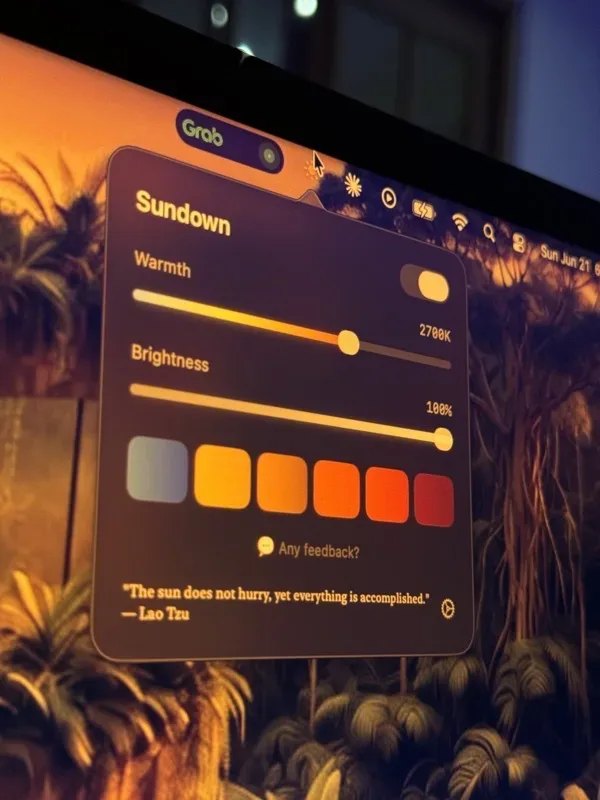
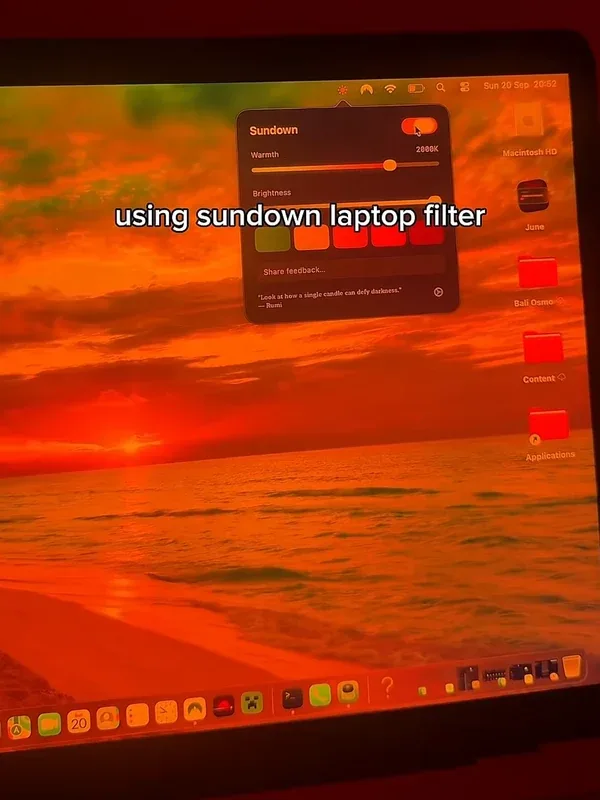
From the developer's own website.
About Sundown
Sundown drives your display far warmer and dimmer than macOS lets you on its own. Night Shift stops at roughly 2700K; Sundown goes down to 500K, deep, candlelight red, on a schedule tied to your local sunset and sunrise. Six presets run from Flow to Biohacker, and gamma-curve dimming takes the screen darker without adding flicker.
Features
- Down to 500K: Night Shift's warmest setting is around 2700K. Sundown keeps going, into candlelight red.
- Tied to the Sun: The schedule follows your actual sunset and sunrise rather than a clock time you have to keep adjusting.
- Six Presets: From Flow, for a gentle evening shift, through to Biohacker for the full treatment.
- Gamma-Curve Dimming: Goes darker than the brightness keys allow without introducing flicker.
- The Research, Cited: A science page linking the primary literature rather than asking you to take the claims on trust.
- Native and Small: Written in Swift with no Electron runtime, about a 6 MB download, and no account to create.
Why Sundown?
Night Shift exists because screen colour late at night is worth changing, but it stops at about 2700K, roughly a warm bulb, which is where most people find it stops helping. If you have tried it and gone looking for more, the thing you were looking for is a lower floor and a darker screen, and that is the whole of what Sundown adds.
-
Pick a Preset
Six of them, from Flow for a light touch to Biohacker for the full shift.
-
Let the Sun Set It
The schedule follows local sunset and sunrise, so it moves through the year without you editing times.
-
Go Darker if You Need To
Gamma-curve dimming takes the display below the brightness keys' floor without adding flicker.
Questions
How is this different from Night Shift?
Range. Night Shift's warmest setting is roughly 2700K; Sundown goes to 500K, which is candlelight red, and dims further using the gamma curve.
What is 500K like?
Deep red, much further than a warm bulb. The presets exist so you can choose how far along that range you actually want to go.
Does it need an account?
No.
How big is it?
About 6 MB. It is native Swift with no Electron runtime.
What does it require?
macOS 14 or later.
Is there evidence behind the settings?
The developer publishes a science page citing the primary research rather than summarising it second-hand.
Views, day by day
Busiest day: Sat 21 Nov, 14 views.
Counted here, on this site: people who opened this page, and how many of them went on to the developer.
More utilities apps
-
 noswitch Turns your MacBook notch into a hub: clipboard history, screenshots, a file shelf, Claude Code/Codex agent status and keep-awake, one hover away.
-
 Wavedance Wavedance is a menu-bar app that runs 20 generative live wallpapers on your Mac: the classic dot grid plus 19 pieces, from ordered dither to halftone and light. Behind your icons, click-through, on every Space. One-time purchase, no subscription.
-
 Tuck by Desktop Goods Hide menu bar icons behind one thin divider, so they stop disappearing behind the notch. Click to peek. No special permissions needed.
-
 Mouse Jiggler Keep your Mac awake while you read, watch a dashboard, or wait for a long task. Mouse Jiggler lives in the menu bar and offers automatic cursor movement, an idle delay, weekday schedules, and stop controls. Free to download, with optional PRO features.
-
 Disk Housekeeper Disk Housekeeper is a native macOS 26 disk cleaner: menu bar free space, Smart Clean for developer caches, Auto-Sort, Autopilot, and a preview before removal.
-
 Mac Window Manager for Tiling & Snapping Tangrid is a native Mac window manager with automatic tiling, snapping, window tabs, search and Dock previews. Try it free for 7 days on macOS 14 or later.