
FlareBar , also on the App Store
Cloudflare Dashboard in Your Mac Menu Bar
Mac
At a glance
- Development
- Freemium
Screenshots

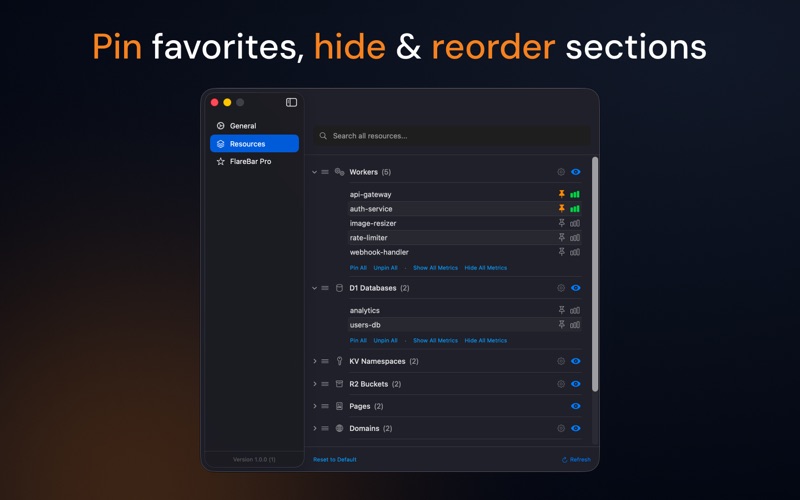


From the developer's own App Store listing.
About FlareBar
Access your Cloudflare® dashboard from the menu bar. Jump to any page instantly. Whether you need to check Worker metrics, update DNS records, or manage R2 buckets, everything is just a click away.
Pricing is described as “Freemium” in our catalogue and “Free” on the developer's page. Check their site for the current terms.
Features
- 🚀 One-Click Navigation - Jump directly to any Cloudflare dashboard page from your menu bar
- 📂 Deep Subpage Access - Quick access to metrics, settings, deployments, and more for each resource
- 🔍 Spotlight-Style Search - Press Cmd+Shift+, to search across all resources and pages instantly
- 📡 Offline Caching - Fast access to your resources even when offline
- 🔐 Secure Storage - API tokens stored safely in macOS Keychain
- 📦 Smart Organization - Resources grouped by type with collapsible sections
- ⚙️ Page Customization - Show/hide and reorder pages within each resource type
- ☁️ Full Resource Support - Workers, Pages, Domains, D1, KV, R2, Queues, Workflows, Durable Objects
Questions
Is FlareBar free?
FlareBar is free to download, with a paid upgrade for more.
Is FlareBar on the Mac App Store?
Yes, FlareBar is on the Mac App Store, so it is reviewed and signed by Apple and installs and updates through the App Store.
Who makes FlareBar?
FlareBar is made by Yash Baheti.
Are there alternatives to FlareBar?
Yes. This directory lists 20 other development apps for the Mac menu bar, and its alternatives page compares them with FlareBar.
Views, day by day
Busiest day: Fri 13 Nov, 11 views.
Counted here, on this site: people who opened this page, and how many of them went on to the developer.
More development apps
-
 L2Cache L2cache is the Developer Memory Layer for macOS — your coding day, with a flight recorder.
-
 SessionRescue Records your terminal windows, tabs and coding-agent sessions, and reopens them in one click. For macOS 13 and later. Fully local.
-
 Blame For developers running AI coding agents: Blame names what is eating your memory and ends only what is safe. Free; Pro $29 once.
-
 Cost Doctor See where your Claude Code and Codex tokens go, and when you will hit your plan limit. Free macOS command; nothing is uploaded.
-
 AgentDuck A macOS menu bar app for Claude Code, Codex, Grok and Cursor: plan limits, tokens and estimated cost, and your Mac
-
 Oh My Android Free, open-source (MIT) native macOS control panel for the Android Emulator and adb devices: one-click dark mode, font scale, RTL, TalkBack, network and GPS, plus a Layout Inspector in dp and an MCP server for AI coding agents. Lives in the menu bar and a floating panel.