

TokenTracker , also on the App Store
Keep AI work in view.
About TokenTracker
Keep AI work in view. TokenTracker brings agent activity, useful notifications, and a local token ledger together on your Mac. Work across Codex, Claude Code, and other AI tools, then check their available activity and usage in one place. FOLLOW WORK FROM YOUR MENU BAR • A flowing light signal reflects activity in the menu bar. Open the popover for current work, today's usage, a heatmap, and supported account quotas. • Tell real-time signals from inferred activity. See sessions grouped by tool and agents waiting for your response. • Choose up to three menu-bar metrics, reorder them, and set rotation. Reorder or hide popover modules to suit your workflow. KNOW WHEN IT NEEDS YOU • With a supported real-time hook connected and notification permission enabled, receive alerts for completed work, approval requests, questions, and failures. • Choose notification types independently. Duplicate events and very short completed tasks are filtered to reduce interruptions. • Optional quota and daily cost-reference budget alerts help you follow usage limits. Available events and quota information vary by tool. BRING YOUR TOOLS TOGETHER Read available records from Codex, Claude Code, Gemini CLI, OpenCode, Kimi, Grok, GitHub Copilot, and more. The integration center shows detected tools, capabilities, and permissions. Enable local reading, real-time hooks, and online queries as needed. Supported accounts can also show quota windows, reset times, or API balances. Record completeness, precision, and connection methods vary by source. EXPLORE THE RECORDS BEHIND THE TOTALS • Compare today, the last 7 or 30 days, or all retained records. Explore trends, model shares, and input, output, reasoning, and cache usage. • Filter by source, model, and project; inspect available session details and export CSV files. • Use source-reported amounts when available; otherwise calculate a reference from token usage and model prices. Unpriced records stay visible. • Display USD or CNY, maintain model prices, and optionally sync public price references. A HIPPO WITH A JOB TO DO An animated hippo responds to working, multitasking, waiting, and resting states. Source badges and session counts add context. Tap to interact, choose whether to show speech, and use light or dark appearance. Animations respect Reduce Motion. The interface supports 22 languages. YOUR LEDGER, ON YOUR MAC No TokenTracker account, ads, or cross-app tracking. The ledger stays on your Mac and does not store conversation bodies. Turn off project and session detail storage or revoke folder access in settings. Grant access to your log folder to begin. Optional hooks modify the relevant tool's configuration and can be uninstalled. Online queries are off by default; when enabled, necessary credentials go directly to the corresponding service. Optional exchange-rate and public model-price requests use Frankfurter and models.dev. Raw logs, prompts, and generated content are not uploaded to TokenTracker servers. The App Store edition is a one-time paid download with no subscription or in-app purchases. Third-party AI services charge separately. Requires macOS 14 or later. Supports Apple silicon and Intel. Costs are calculation references, not charges or official bills. Quotas, balances, and local usage are tracked separately. TokenTracker is independent and is not affiliated with supported third-party services.
Screenshots
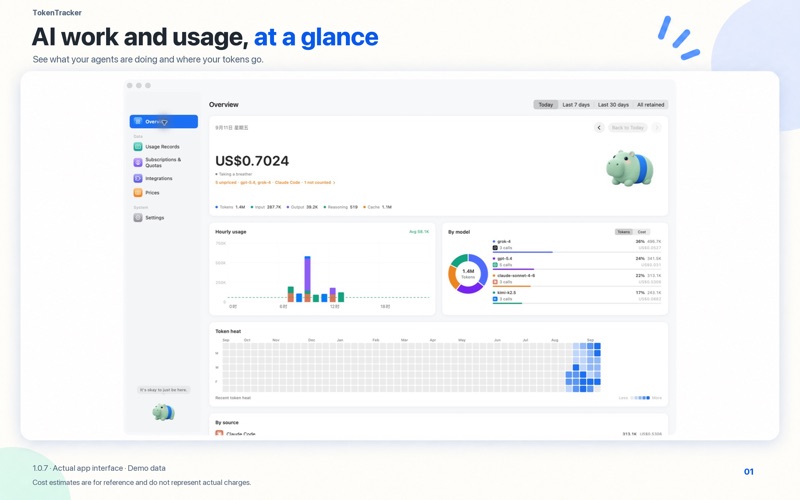
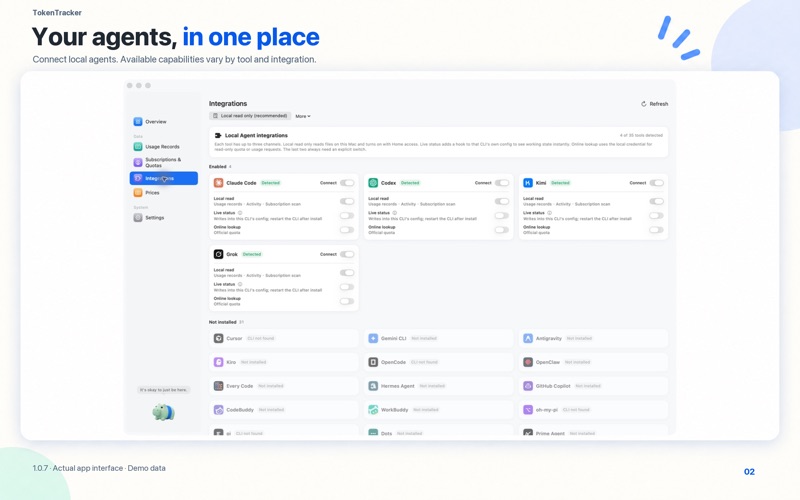


From the developer's own App Store listing.
Features
- A flowing light signal reflects activity in the menu bar. Open the popover for current work, today's usage, a heatmap, and supported account quotas.
- Tell real-time signals from inferred activity. See sessions grouped by tool and agents waiting for your response.
- Choose up to three menu-bar metrics, reorder them, and set rotation. Reorder or hide popover modules to suit your workflow.
- With a supported real-time hook connected and notification permission enabled, receive alerts for completed work, approval requests, questions, and failures.
- Choose notification types independently. Duplicate events and very short completed tasks are filtered to reduce interruptions.
- Optional quota and daily cost-reference budget alerts help you follow usage limits. Available events and quota information vary by tool.
More development apps
See the category-
 SnipperApp 3 Stop digging through old projects, scattered Gists, and random text files.
 -
 Belay Keeps your Mac awake while AI coding agents work, then lets it sleep the moment they finish. Auto-detects Claude Code, Codex, Copilot CLI and Cline; free, no telemetry, 7 languages.
 -
 Honey for Mac Honey for Mac: reduce token waste across AI coding agents from the menu bar
 -
 Back Know the Moment an AI Outage Ends
 -
 Mimir Every AI Coding Quota in Your Menu Bar
 -
 VibeMenu Keep Your Mac Awake While Coding Agents Work