

MacMetra , also on the App Store
MacMetra is a system monitor that lives in the menu bar of your Mac.
About MacMetra
MacMetra is a system monitor that lives in the menu bar of your Mac. No Dock icon, no main window — just the readings you want, where you can always see them, and a dashboard one click away. IN THE MENU BAR CPU, TEMP and RAM, in one compact item. Choose which of the three appear, and in what order. THE DASHBOARD — FIVE CARDS, ONE CLICK AWAY • CPU — total load as a ring, split into user, system and idle, with a plain-English band from Low to High. • Memory — used and free in gigabytes, plus the memory pressure the system itself reports: Normal, Warning or Critical. • Storage — space available on your startup disk against its size, as a figure and as a bar. • Thermal — the system's own four-step thermal state: Good, Fair, High, Max. • Power — charging, charged, connected or on battery, with the charge level, the time to a full charge, and whether Low Power Mode is on. REAL TIME, AT YOUR CADENCE CPU and memory refresh as often as twice a second. You pick how often. PRIVACY BY CONSTRUCTION MacMetra runs in the App Sandbox with no network access. No accounts, no analytics, no telemetry. It records no history, so there is nothing to browse, export or leak — the readings exist while they are on screen, and then they are gone. NO HELPERS, NO PASSWORDS MacMetra reads the counters the system publishes about itself, including its own four-step thermal state. That is what keeps it inside the sandbox: no admin password, no helper tool, no kernel extension. Per-sensor temperatures and fan speeds live outside that boundary, so MacMetra reports the system thermal state instead. FULLY NATIVE Written in Swift and SwiftUI, with the newest system materials on macOS 26 and later. Native on both Apple silicon and Intel. Requires macOS 14 or later. Launch at login is one switch away. TRY IT FREE Every feature is free for 7 days. After that, a one-time Lifetime Unlock keeps it going — a purchase, not a subscription. There is nothing to renew and nothing to cancel. MacMetra keeps running either way: its icon stays in the menu bar, and its own Settings and About windows stay available. MacMetra is an independent product, not affiliated with, endorsed by or sponsored by Apple. Mac and macOS are trademarks of Apple Inc., registered in the U.S. and other countries and regions.
Screenshots


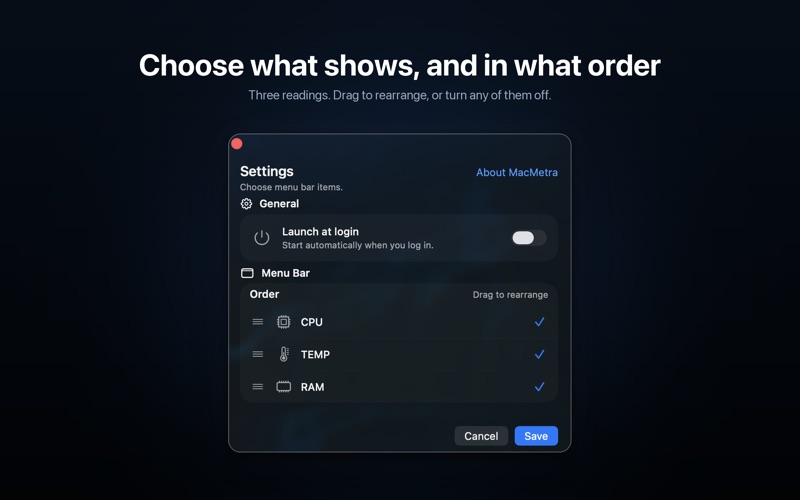

From the developer's own App Store listing.
Features
- CPU — total load as a ring, split into user, system and idle, with a plain-English band from Low to High.
- Memory — used and free in gigabytes, plus the memory pressure the system itself reports: Normal, Warning or Critical.
- Storage — space available on your startup disk against its size, as a figure and as a bar.
- Thermal — the system's own four-step thermal state: Good, Fair, High, Max.
- Power — charging, charged, connected or on battery, with the charge level, the time to a full charge, and whether Low Power Mode is on.