

App Archiver for macOS , also on the App Store
I like keeping useful apps around.
About App Archiver for macOS
I like keeping useful apps around. Deleting one to save space often means forgetting it existed until the day I need it again. That is why I made App Archiver. App Archiver reclaims disk space from apps you rarely use while keeping them visible and available for later. Unlike cleaner tools that remove temporary caches which quickly return, App Archiver gives you lasting ways to reduce the space used by the apps themselves. Choose the right approach for every app. OPTIMIZE AND KEEP USING IT Apply native macOS filesystem compression while keeping an app installed, ready to open, and available for updates. App Archiver prepares and verifies the optimized copy before replacing anything. ARCHIVE IT IN PLACE Compress a rarely used app into a lightweight restorable version that stays in its original location. Its icon remains in Applications, so you will remember what you have without giving it unnecessary disk space. Open the archived app whenever you need to restore and use it again. CREATE VERIFIED BACKUPS Save ZIP or DMG backups in any folder or external drive you choose, then restore either format directly with App Archiver. Keep the installed app, or remove it only after the backup passes verification. INCLUDE APP DATA When optimizing, archiving, or backing up an app, you can optionally add a path to its data. The selected data is linked to the app's backup or archive and optimized together with the main app. WORKS WITH APP TRUST PREVIEW App Trust Preview is a separate app available on the Mac App Store. Find it by searching for "App Trust Preview" in the Mac App Store. App Archiver is fully compatible with App Trust Preview. After installing both apps, add App Archiver to the "Open with other apps" panel in App Trust Preview. You can then archive, optimize, or restore apps directly from Quick Look. AUTOMATIC FILE OPTIMIZATION For automatic optimization and deduplication of files and folders, try DiskPress, a separate app in the Mac App Store. It is also available in the Storage Saver Duo app bundle. FIND YOUR BEST OPPORTUNITIES - See disk usage and available space at a glance - Find large and rarely opened apps automatically - Browse installed, optimized, archived, and backed-up apps - Search, filter, sort, and reveal apps in Finder - Estimate archive size and potential savings before you start - Track the space reclaimed by optimization and archiving - Keep multiple backup versions in Archive Storage - Reconnect backups stored on removable drives BUILT AROUND SAFE CHANGES Before making changes, App Archiver checks available disk space and works in a private staging area. It validates checksums, app identity, executables, signatures, and restored contents. The original remains unchanged until the replacement or backup is ready. If an archive would not save space, it is not applied. PRIVATE BY DESIGN App Archiver is built to work without Internet access. App analysis, compression, and restoration happen entirely on your Mac. The app does not connect to online services, collect your data, or track you. System apps cannot be archived. Some apps protected by macOS may require additional steps.
Screenshots


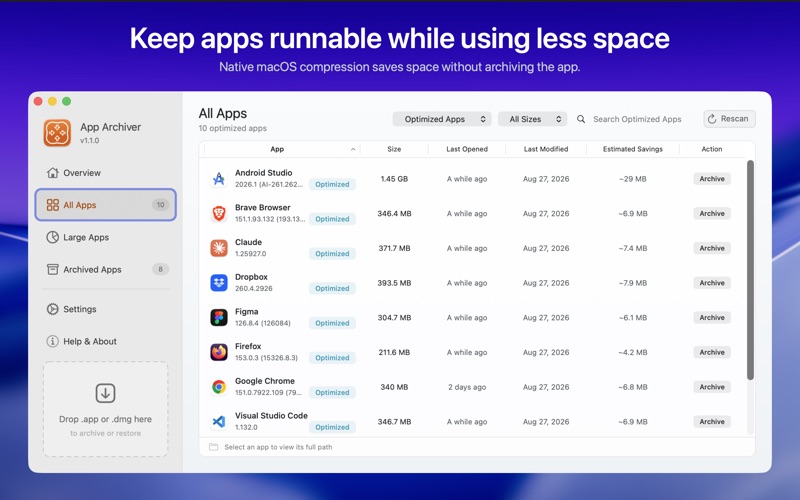
From the developer's own App Store listing.
Features
- See disk usage and available space at a glance
- Find large and rarely opened apps automatically
- Browse installed, optimized, archived, and backed-up apps
- Search, filter, sort, and reveal apps in Finder
- Estimate archive size and potential savings before you start
- Track the space reclaimed by optimization and archiving
More utilities apps
See the category-
 App Trust Preview App Trust Preview helps you understand Mac software before opening or installing it.
 -
 DynamicHorizon Reimagine your macOS notch with Dynamic Horizon. Responsive animations meet powerful features for the ultimate Mac experience.
 -
Lid Keeper Keep a MacBook awake with the lid closed—one menu-bar switch, session telemetry, and a fail-safe return to normal sleep.
-
 Dropshare Upload to Your Own Storage, Share a Link
 -
Ese A Battery Menu Bar That Predicts, Not Just Reports
-
 Holeberry Your Pi-hole, From the Menu Bar