
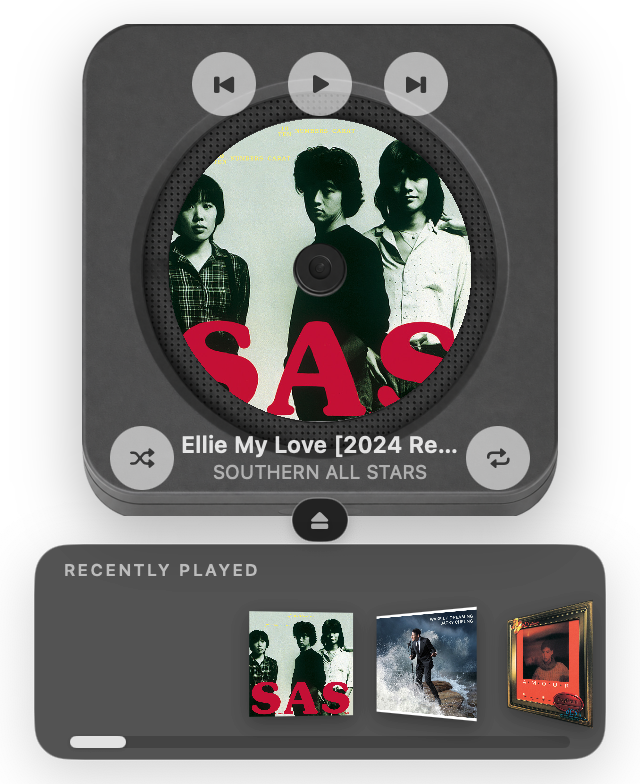
Platter: Desktop CD Player , also on the App Store
Platter is a little CD player for your Mac.
Mac
Screenshots


From the developer's own App Store listing.
About Platter: Desktop CD Player
Platter is a little CD player for your Mac. A real 3D player sits on your desktop — click an album, or drag it onto the disc, and the old disc slides out while the new one drops in and spins. Connect Apple Music or Spotify: • Apple Music — Platter plays your music directly. Your recently played tracks, library songs, and playlists land on the shelf. Play a whole playlist as a single CD, and open its track list to jump to any song. No need to keep the Music app open. • Spotify — Platter is a companion for the Spotify desktop app. Open Spotify, then click a recent cover or drag it onto the disc, or use the on-disc controls. More: • Play, pause, skip, shuffle, and repeat right on the player • A menu bar mini player for when screen space is tight • A light or dark player to match your desktop • English, 简体中文, and 日本語 Free to download. Try everything free for 7 days, then unlock Platter forever with a one-time purchase. No subscription. Requires an Apple Music subscription or a Spotify account. Platter is not affiliated with, or endorsed by, Apple or Spotify.
Features
- Apple Music — Platter plays your music directly. Your recently played tracks, library songs, and playlists land on the shelf. Play a whole playlist as a single
- Spotify — Platter is a companion for the Spotify desktop app. Open Spotify, then click a recent cover or drag it onto the disc, or use the on-disc controls.
- Play, pause, skip, shuffle, and repeat right on the player
- A menu bar mini player for when screen space is tight
- A light or dark player to match your desktop
- English, 简体中文, and 日本語
More audio apps
-
 Hermes Hermes is a tiny menu bar app that lets you switch your Bluetooth headphones between Macs with a single click.
-
 KleenMic Microphone noise cancellation for clearer calls on Mac and Windows. Try KleenMic free for 72 hours, no card or account. $20 once.
-
 SoundBuddy Keep your preferred microphone selected with SoundBuddy for Mac.
-
 RadioStation Listen to live radio stations from your own country and around the world, and pause or rewind up to 30 minutes.
-
 MicMix Un microfono virtuale per macOS che unisce il microfono e l
-
 Klakk Play mechanical keyboard sounds as you type on Mac or Windows. Choose from 14 sound packs, adjust the volume, and try Klakk free for 3 days.