

Command Reopen , also on the App Store
Bring minimized windows back automatically when you press Cmd+Tab.
About Command Reopen
Bring minimized windows back automatically when you press Cmd+Tab. Command Reopen fixes one irritating macOS behavior: you switch to an app with Cmd+Tab, the app activates, but its minimized window stays hidden in the Dock — or nothing appears because the last window was closed. Keep your native workflow: It preserves the native macOS app switcher. It does not replace Cmd+Tab with a launcher, window manager, or custom switcher. Keep the muscle memory you already rely on. What it fixes: • An app activates on Cmd+Tab, but its minimized window stays hidden in the Dock • You closed an app's last window and Cmd+Tab switches back to an empty screen Built-in controls: • Exclude apps you prefer to manage manually • Lightweight menu bar utility with ultra-low resource usage Zero permissions: • No Accessibility permission required • No Screen Recording permission required • 100% private, runs locally with no tracking Source code available on GitHub. Terms of Use: https://www.apple.com/legal/internet-services/itunes/dev/stdeula/
Screenshots

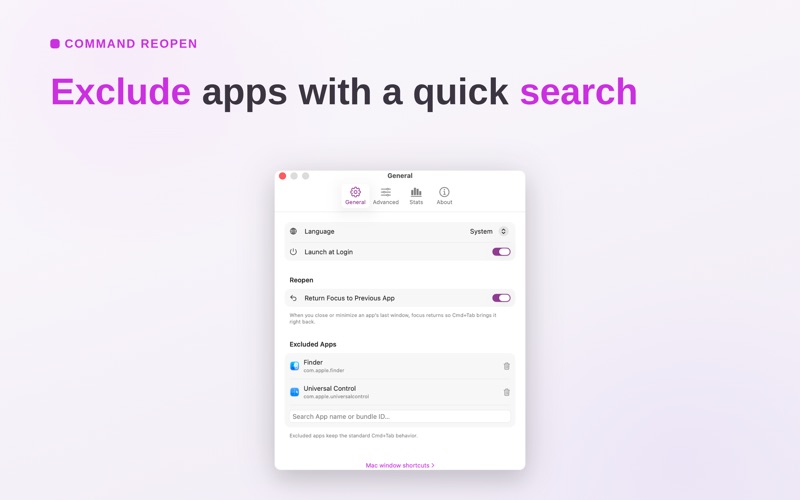

From the developer's own App Store listing.
Features
- An app activates on Cmd+Tab, but its minimized window stays hidden in the Dock
- You closed an app's last window and Cmd+Tab switches back to an empty screen
- Exclude apps you prefer to manage manually
- Lightweight menu bar utility with ultra-low resource usage
- No Accessibility permission required
- No Screen Recording permission required
More utilities apps
See the category-
 Deskthaw Deskthaw waits out your calls, then shows one short seated move for the part that is stiff. A free menu bar app for the Mac, in public beta.
 -
FingerBridge FingerBridge helps Apple Silicon Mac users keep their preferred keyboard and use an external fingerprint sensor for supported password prompts. After an enrolled finger matches, the app fills the saved Mac password in supported lock-screen and administrator password fields, with optional automatic Enter. Its menu bar controls include opening the app, checking a fingerprint, reconnecting the sensor and pausing autofill. Requires macOS 13 or later and the separately purchased Waveshare UART Fingerprint Sensor (F), SKU 31887. Other readers are not supported in this release. Software costs $9 once, one Mac per activation. Passwords are stored in Mac Keychain and fingerprint templates stay on the sensor. Activation requires internet; activated licenses work offline. This is password autofill, not Apple Touch ID. It does not replace FileVault startup login, Apple Pay, passkeys or website password managers. Some password dialogs are unsupported. Submitted by the developer, Yeonghwan Kang.
-
 MacClean Mac 磁盘空间不足?用 MacClean 分析空间占用,清理微信媒体、应用缓存与 Xcode 开发缓存,查找重复文件、卸载应用并检查残留。扫描免费,全部功能可试用 7 天,支持 macOS 14+。
 -
 Record & Transcribe Calls on Mac Record Zoom, Teams, and Google Meet calls on your Mac. Get on-device transcription and AI summaries. Free, with no meeting bot or cloud processing.
 -
 Roy Tiny and delightful color picker for designers that lives in your Mac menu bar.
 -
 Tuck Hide and organize Mac menu bar icons, reveal them when needed, and use Shelf Mode to keep hidden items accessible on notched MacBooks. Zero telemetry.